Här skriver vi artiklar runt SDR och övrig mjukvara som har något gemensamt med satelliter.
Posts and guides about SDR and satellite software related topics.
Look4Sat is an Android app for tracking satellites. It uses the database from SatNOGS for frequency info and also presents the frequency with doppler correction. As I know this is the only Android app that display doppler correction. I can highly recommend this app for portable tracking!
In SDR-Console each satellite can have custom frequency data for both up- and downlink. The XML files below are generated from the Amateur Satellite Database project.
This is how to install the XML files for your SDR Console:
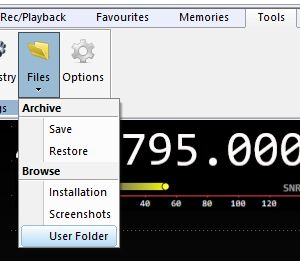
From SDR Console, open your local user folder.
Make a backup of all your local files!
Unzip all the files in the SDR_SAT_Custom_data.zip to your user folder. If you already have XML file for a satellite you can choose not to overwrite it.
Restart SDR-Console.
Now all the XML Custom Satellite data files are available the next time you select a satellite.
Note that many satellites needs correction for mode (default RX mode is FM-W and TX mode is FM), filter etc. but this can be a good start and you do not need to manually enter all the data.
Here a short video of IC-705 Frequency and Doppler control from SDR-Console. The first part is frequency control with VFO following the radio. The second part is doppler control from the Satellite External Radio control.
Download the OmniRig config file from: https://sm7iun.se/station/ic705/ Be sure to use the correct CI-V hex code in the seetings for IC-705.
This is a short guide how to create a simple batch file for Windows for downloading the latest kepler element before starting a satellite application. In this exemple, I am downloading kepler before starting the program GetKISS (by DK3WN).
First, create the .bat-file in a text editor and name it, for example, getkiss_starter.bat The secret is to use the Windows program bitsadmin for downloading from web. Modify the folder path after your needs:
# Delete the old file before downloading new
del “c:\yourfolderpath\satnogs.txt”
# Use bitsadmin for downloading
bitsadmin /transfer mydownloadjob /download /priority normal “https://www.celestrak.com/NORAD/elements/satnogs.txt” “c:\yourfolderpath\satnogs.txt”
# Start the program
“C:\yourfolderpath\getkiss.exe”
Then, start GetKISS with the file getkiss_starter.bat and you will always have the latest kepler!
When using several softwares for satellite telemetry decoding it is essential that you have the possibility to move (pipe) the audio streams between the different programs. One of the best programs is Virtual Audio Cable (VAC).
I will describe the fastest way to get started with this program on Windows 10.
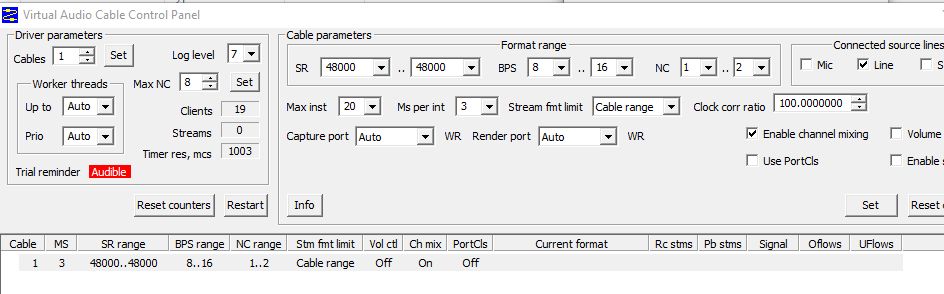
Setup a virtual audio line:
After installing VAC, the first thing you do is to set up a virtual line with the control panel . I’m using a sample of 48 kHz like this:
Use the virtual line from source software:
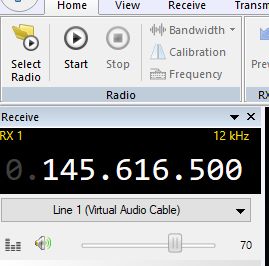
In this case I’m using SDR-Console V3 and choosing the virtual line as output.
Use the virtual line at destination software:
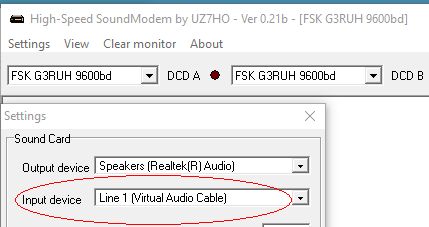
For decoding telemetry the first step is using a sound decoder, here Soundmodem. Set the audio input line to the virtual line:
Now you have created a audio pipe “inside” your PC!
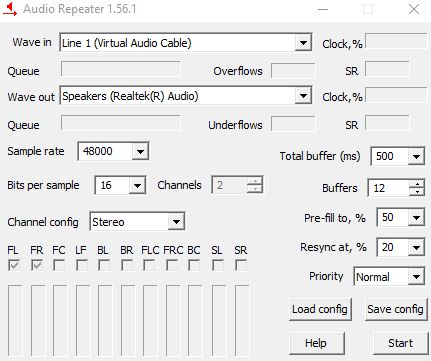
If you would like to listen to the audio, you can use VACs Audio Repeater to also pipe the virtual line to your computer’s audio output (headphones or speakers):