Categories
Ham Satellite news

PCSAT Default Beacon Transmissions 144.390 MHz

Det har visat sig att PcSat skickar ut beacon på 144.390 MHz vilket Bob Bruninga, WB4APR, förklarar varför här:
An FM APRS signal has been received in England causing interference to the MGM
frequency and weak-signal Meteor Scatter (MS) operation which is just below
144.390 MHz. A MS DXpedition was disrupted by such activity earlier in the month
and interference has been occurring at various times since.

Bob Bruninga, WB4APR, explains that the beacon was planned over 15 years ago for
operation only when PCSAT is over North America based on published band plans at
that time. Now, after 14 years on orbit, the ability to turn that backup beacon
off has been lost.

PCSAT (now 14 years old) had a backup fail-safe beacon on 144.39 that
would activate after any unknown spacecraft reset to give a backup comm
link in case the primary 145.825 channel died.  Being on the North
American APRS frequency with hundreds of IGates there would always be at
least one that would hear this “emergency call home” from PCSAT even
though the channel is generally saturated.  It worked.

The problem is, that now PCSAT resets on every orbit due to negative power
budget and so, on every orbit that beacon comes back on.  Even if we did
get a command up to reset it, that setting would last only 15 minutes to
the next eclipse.

We learned our lesson!  That was our FIRST amateur satellite and we sure
learned NOT to use a “connected-packet-command link” that needs ACKS and
Retries and logon passwords  just to LOGON before you can even send a
SHUTUP command.  All our satellites since, operate without the multiple
Send, connect, ACK, retry, ACK, command, ACK overhead…. just to get one
command understood.  Now, only the receiver on the spacecraft has to be
functional to command it to silence in a single packet.  But too late for
PCSAT.

We are sorry that we have no good answers.  But we hope we can mitigate
this instance of “friendly fire” collateral damage so that we don’t cause
an overall black-eye to amateur radio overall friendly operations?

What you may hear will be 2 one-second packets per minute, one at 1200
baud and one at 9600 baud, trying to “call home”.

[ANS thanks Bob, WB4APR, for the above information]

Categories
Ham Satellite news

Möjlighet till kommande Phase-3E uppskjutning

p3e
P3E enligt originaldesign runt år 2005.

AMSAT-NA rapporterar att det kan finnas en möjlighet till en kommande Phase-3E uppskjutning. Detta innebär att den satellit som ligger på “lager” i Tyskland kanske kan komma upp i alla fall!

AMSAT News Service Bulletin 206.01
From AMSAT HQ KENSINGTON, MD.
July 25, 2015
To All RADIO AMATEURS
BID: $ANS-206.01

AMSAT-NA, AMSAT-DL, and Virginia Tech Announce Potential Phase-3E
Opportunity

Virginia Tech has approached the US Government to fly the Phase 3-E space
frame into High Earth Orbit (HEO) in order to support scientific payloads as
well as serve as an amateur radio satellite. During the AMSAT-DL Annual
Meeting on 4 JUL 15, the AMSAT-DL membership approved the concept, agreeing
to allow the Phase 3-E space frame that is currently stored in Germany to be
shipped to Virginia Tech in the USA for further construction, testing and
preparation for eventual launch to HEO should the US Government formally
agree to fund such a mission.

Should the project move forward, AMSAT-NA will apply for frequency
coordination from the IARU Satellite Advisor and satellite licensing from
the FCC as the satellite’s initial operator.

Stay tuned to the AMSAT-DL Journal, the AMSAT-NA Journal, and the AMSAT-NA
News Service for further developments and details as they become known.


Categories
Ham Satellite news

AMSAT-SM HF-nätet 26/7 2015

Hej!

Länge sedan jag avgav någon rapport från satellitnätet på 3740 KHz.

Dagens deltagare:
SM4EFW
SM4JLX
SK6SAQ
SM6NZV
SM7WSJ

*Lite nytt om P3E  (Man skall aldrig ge upp…)  Se denna notis.

*ISS synlig på nätterna

*Amsat-UK  konferens

http://batc.tv/live/events/amsatuk/

Vi hpppas att vara igång även nästa söndag     Med vänlig hälsning  Håkan SM7WSJ

Categories
Hamradio from ISS

ISS SSTV den 18-19 juli

RX by Kurt Winebäck
RX by Kurt Winebäck vid förra SSTV-tillfället från ISS.

Nu är det dags igen för SSTV från ISS!  18 till 19 juli sänds det på 145.800 MHz FM.

Mera info:
http://amsat-uk.org/2015/07/14/iss-sstv-july-18-19/

Categories
Telemetry

Hur man dekodar DeorbitSail

DK3wn har skrivit en bra artikel om hur man dekodar DeorbitSail. Se http://www.dk3wn.info/p/?p=61666

Thank you DK3WN for this article and your software!

Categories
Antennas SDR and software

Control SPID SPX rotor from SDR Console

SPX AZ-01

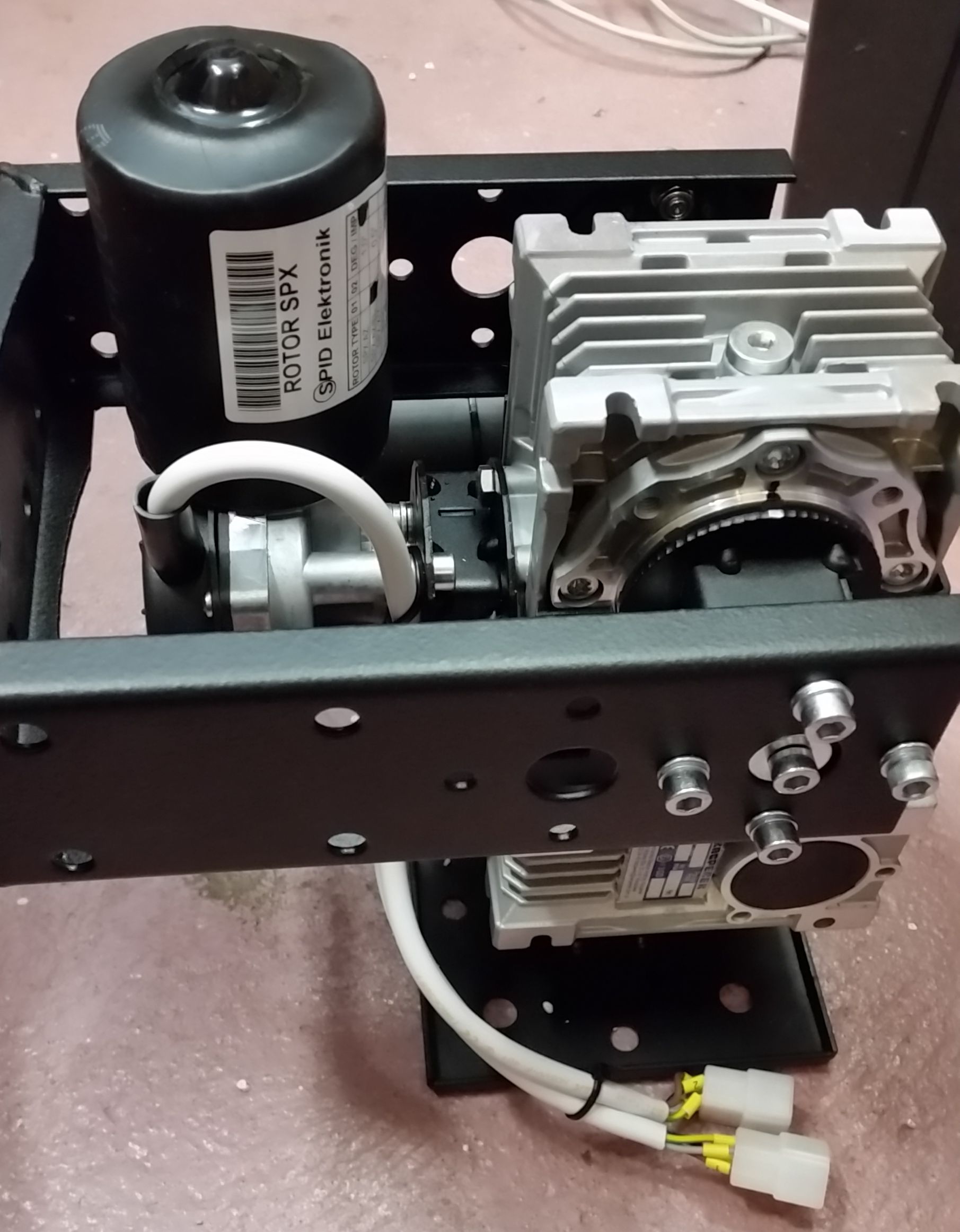
SPX Model 01 and 02 Azimuth and Elevation Rotor is a low weight, low cost rotor from SPID Elektronik and work very well out-of-the-box with USB control box Rot2Prog from tracking software like WXtrack (tested by me).

When controlling this rotor from the popular SDR Console software you have to use a DDE client. These are the steps to setup up successful rotor control:

Installation of USB drivers for Rot2Prog

If you have problems with automatic installation of Windows virtual COM/USB-drivers for the Rot2Prog controller, download drivers from http://www.ftdichip.com/Drivers/VCP.htm

Setup the correct baudrate

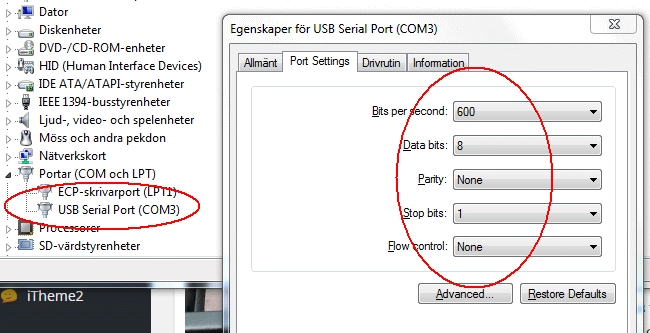
When the drivers are installed, you have to setup the correct baudrate. Go to the PC system configurations, look for the new COM-port installed. Set to 600 baud, 8 data bits, no parity, 1 stop bit.
SPX setup COM

Setup the Rot2Prog for GS232

Setup the Rot2Prog for automatic control with interface GS232. See the Rot2Prog manual page 10 to 11.

Install and setup Wisp DDE Client

Download and install Wisp DDE Client from this page: http://www.mederoscnc.com/CX6DD/wispdde/wispdde.htm

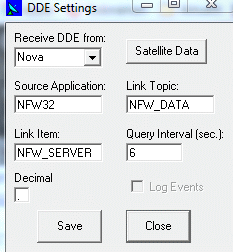
Set the DDE setting as follow:

SPX wisp client DDE

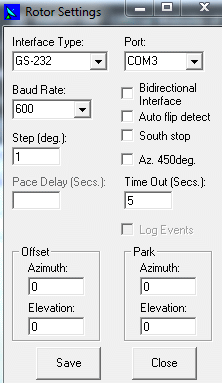
Set the Rotor setting as follow:

SPX wisp client Rotor

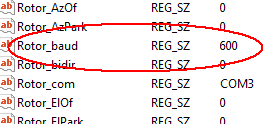
Note! You cannot change the Baud Rate in the DDE Client to 600 baud, you have to edit this in Windows Register editor, key HKEY_CURRENT_USER\Software\VB and VBA Program Settings\WiSP_DDE_Client\Config\Rotor_baud

SPX wisp client regedit

Now try to manually control the rotor from Wisp DDE client.

Setup SDR Console satellite tracking

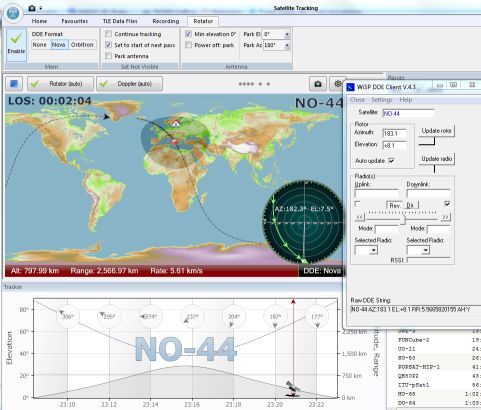
In SDR Console satellite tracking, set to DDE Format to Nova. Thats all!

Start tracking

Select a satellite to track in SDR Console. The DDE server in SDR Console now starts talking to the Wisp DDE Client and should control the SPX rotor. Look at the raw DDE String:

SPX with SDR tracking