
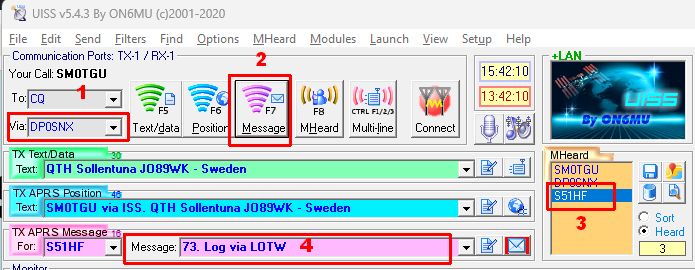
This is how I used UISS to work a QSO via SONATE-2 satellite. Note: it is not a complete setup guide how UISS and Soundmodem. You can use Google if you need a guide, see this post for IC-9700 or look at this post for IC-705.
- Be sure to use DP0SNX as your “via” callsign, to be able to get digipeater via SONATE-2.
- Press F7 och click Message to send your text in the “TX APRS Message” area. When you call CQ, change “For” to CQ. In the Message area you can enter your locator.
- When someone answer you you can see the callsign the “MHeard” area. Just click on the callsign, and “For” in the “TX APRS Message” area will change to this callsign.
- Now you can answer back (reply and confirm) to complete the QSO.
SONATE-2 is using simplex 145.825 MHz FM. More info at this page.